> For the complete documentation index, see [llms.txt](https://docs.radiusaas.com/llms.txt). Markdown versions of documentation pages are available by appending `.md` to page URLs; this page is available as [Markdown](https://docs.radiusaas.com/other/changelog/final-notice-radius-proxy-ip-migration-required-before-10-july-2026.md).
# FINAL NOTICE: RADIUS Proxy IP Migration Required Before 10 July 2026
As part of the ongoing RADIUSaaS Proxy IP address migration, all customers using RADIUSaaS Proxies are required to complete the proxy update before **10 July 2026.**
This is a **mandatory change**. Customers who have not completed the migration by this date will no longer be able to use the existing (legacy) RADIUS Proxy IP addresses.
## Required action
Before 10 July 2026:
1. Review your network configuration and ensure your network equipment is prepared for the new RADIUS Proxy IP addresses.
2. Complete the Proxy Update from the RADIUSaaS Admin Portal.
3. Verify that your network devices are configured to communicate with the new proxy IP addresses.
## Important notice
The previous proxy IP addresses will be retired after **10 July 2026**. After this date, they will no longer be supported and authentication traffic using the legacy addresses may fail.
No further extensions or exceptions to this deadline will be provided. Customers who do not complete the migration before the deadline will need to update their configuration before RADIUS authentication can resume.
We recommend completing this change as soon as possible to avoid any potential service disruption.
***
## Proxy Update
As part of the [**March 2026 Release**](/other/changelog.md#march-2026-release), we are finalizing the migration of our managed **RADIUSaaS proxies**. Administrators using RADIUSaaS proxies will see a pop-up window titled **“Proxy Infrastructure Update”** with three options: ***Postpone***, ***Go To Proxies***, and ***Update***.
If you haven’t already, ensure your network equipment is configured for the new proxy IP addresses (see [How to check if you are affected](#how-to-check-if-you-are-affected) for details).
When you click ***Update***, your tenant’s proxies will be updated. **Once the update completes, the legacy proxy IP addresses will no longer work**.
***Go To Proxies*** open the **Proxy Settings** page to review your configuration.
## What You Need to Do
If your configuration uses one of the affected RADIUS proxies, you must:
1. **Update your network equipment** to use the new RADIUS proxy IP address.
2. **Run the** [**Proxy Update**](#proxy-update) (latest by **10 July 2026**).
## How to check if you are affected
{% hint style="info" %}
In general, only customers using the **RADIUS protocol** may be affected. If you are using **RadSec only**, no action is required, since you are not using the RADIUSaaS Proxy services.
Note that not every proxy server requires an IP address change.
{% endhint %}
You can verify whether your proxy configuration is impacted by logging into the **RADIUSaaS Admin Web Portal**:
* Navigate to your **proxy configuration**.
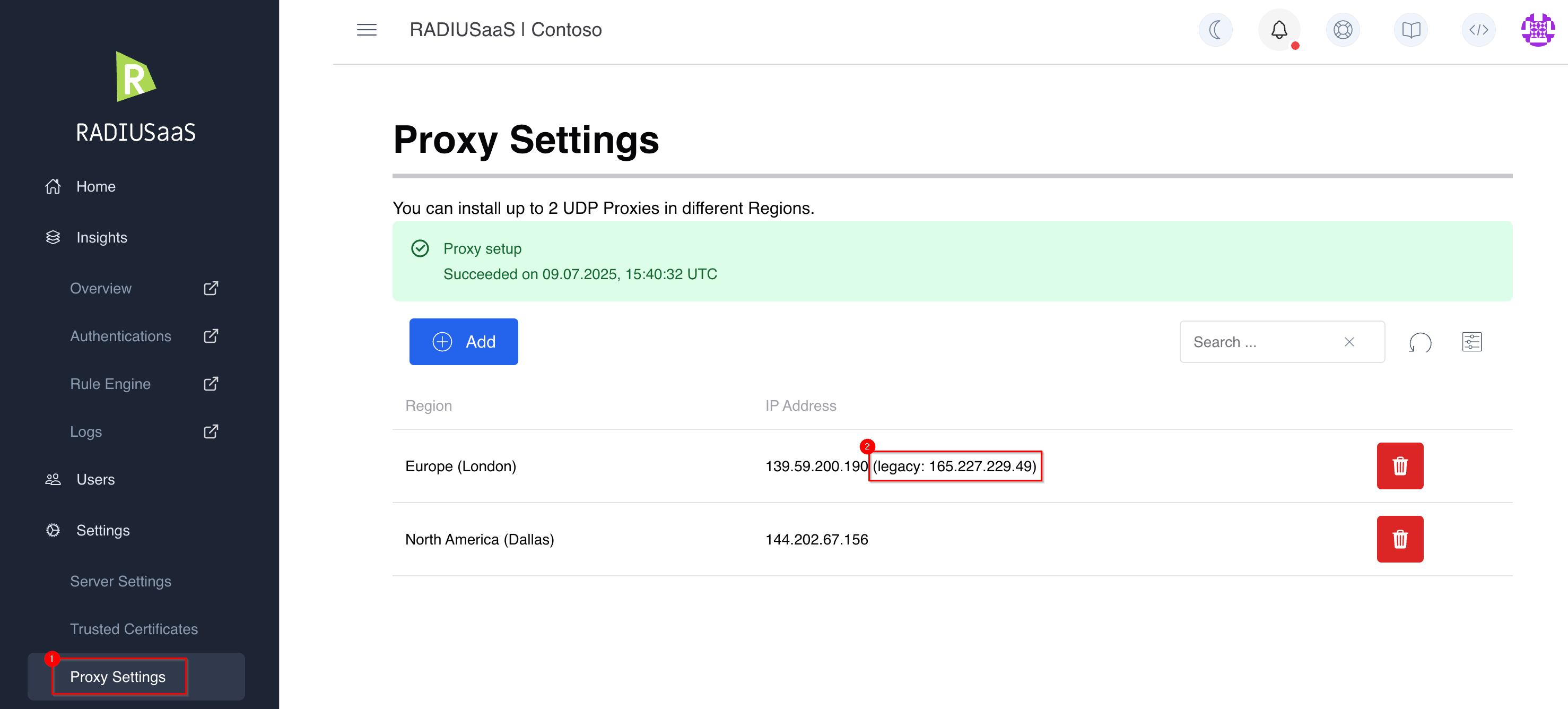
* If your proxy is affected, you will see:
* A **new IP address** is listed.
* A **legacy IP address** is shown in parentheses, labeled with the word **"legacy"**.
In the following example, the proxy with the region "Europe (London)" is affected, while the proxy with the region "North America (Dallas)" is not affected. The customer is required to change the IP address for the Europe (London) proxy in their network equipment, while 165.227.229.49 is the old IP address and 139.59.200.190 is the new address:
## Need Help?
If you have any questions or need assistance updating your configuration, please contact our support team via the [RADIUSaaS Support Portal](https://support.radiusaas.com/support/tickets/new?ticket_form=technical_support_request_%28radiusaas%29).
---
# Agent Instructions
This documentation is published with GitBook. GitBook is the documentation platform designed so that both humans and AI agents can read, navigate, and reason over technical content effectively. Learn more at gitbook.com.
## Querying This Documentation
If you need additional information that is not directly available in this page, you can query the documentation by asking a question.
Perform an HTTP GET request on the following URL with the `ask` and `goal` query parameters:
```
GET https://docs.radiusaas.com/other/changelog/final-notice-radius-proxy-ip-migration-required-before-10-july-2026.md?ask=&goal=
```
`ask` is the immediate question: it should be specific, self-contained, and written in natural language.
`goal` is what the user is ultimately trying to achieve, the reason they need the answer. Sharing it helps GitBook give you a better, more relevant answer. A goal is most helpful when it describes the outcome the user wants rather than restating the question. For example, with `ask=how do I create an API token`, a goal like `automate deployments from our CI pipeline` lets GitBook tailor the answer to that use case.
The response will contain a direct answer to the question and relevant excerpts and sources from the documentation.
Use this mechanism when the answer is not explicitly present in the current page, you need clarification or additional context, or you want to retrieve related documentation sections.